
The best contractor websites: 24 examples and what to copy
Borrow from thebuilders who win.
24 live contractor websites.Captured same day, same size.The move a smaller shop can copy.
YOU OWN IT.

Key takeaways
- The best contractor websites answer three questions in the first screen: what you build, where you build, and how to start. Most of the 24 below answer two.
- Large general contractors sell to owners, recruit workers and court subcontractors from one homepage. The strongest ones give each audience its own door so the sales path stays clean.
- Home service contractors win with offers you can see at a glance: a phone number, a review count, a free estimate, financing. Long Fence puts all four in the header.
- Only 6 of 24 show a phone number in the first screen. For a local contractor that is the cheapest fix on this list.
How these were picked
Method
The list started from the sites that Google and the ranking roundups cite for “best contractor websites” and “best construction websites”, then added trade contractors a small business owner can compare against. Every site is a working company website in the United States, not a template demo.
Each homepage was opened in Chrome at 1440 by 900 pixels on 20 October 2026. Cookie banners and promotional popups were closed the way a visitor would close them, and the first screen was captured as you see the shot here. The counts in this guide come from those first screens.
The examples sit in three groups: national general contractors, regional builders, and the remodelers and trade contractors who sell to homeowners. Jump to national contractors, regional builders, remodelers and home builders or roofing, fence and home service.
National general contractors
Large builders with large budgets. Copy the structure, not the video production.
01. Turner Construction
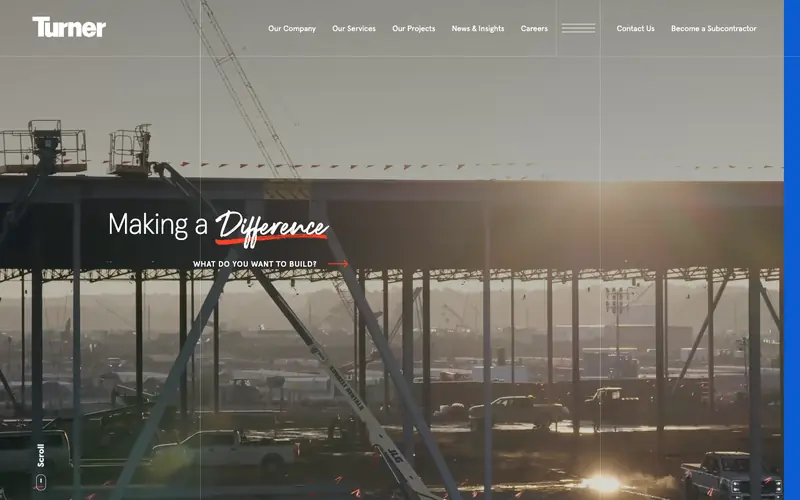
Turner opens on a full-bleed job site video, a script accent on the word “Difference” and one small prompt under the headline: “What do you want to build?” The prompt turns a brand statement into a question an owner can answer, and the link routes straight to projects.
The header keeps the paths apart. Owners get Services and Projects, workers get Careers, and trade partners get a separate “Become a Subcontractor” link, so nobody wanders into the wrong funnel.
Copy this: put one routing question under your headline, and give subcontractors and job seekers their own link so the main button stays for customers.
02. Brasfield & Gorrie
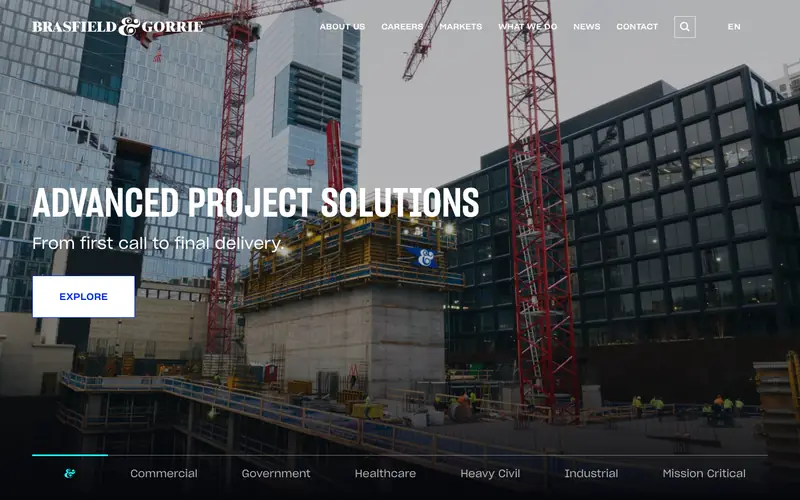
The browser tab reads “2026 ENR Southeast Contractor of the Year” before the page even loads. That award sits in the title tag, which means the line shows in Google results and in every bookmark.
Along the bottom of the hero, six market tabs (Commercial, Government, Healthcare, Heavy Civil, Industrial, Mission Critical) let a hospital board or a city buyer pick a lane in the first screen.
Copy this: put your strongest credential in the page title, and list the markets you build for as buttons at the bottom of the hero.
03. McCarthy Building Companies
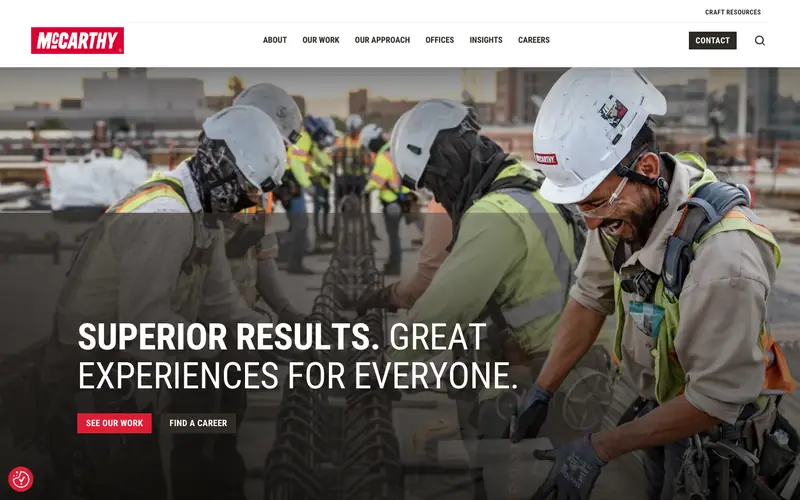
McCarthy leads with people, not a building: a crew in hard hats, mid-laugh, under the line “Superior results. Great experiences for everyone.” The photo sells the culture an owner will work alongside for two years.
Two buttons follow, “See our work” and “Find a career”, with a dark Contact button pinned in the header. Three actions, three audiences, no confusion.
Copy this: use a candid photo of your own crew as the hero, then offer exactly two buttons under the headline.
04. Sundt Construction
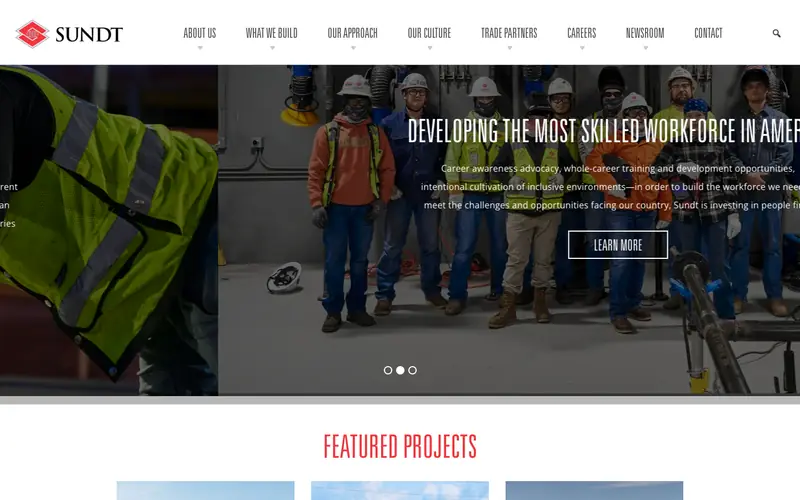
Sundt, headquartered a few miles from JT Studio in Tempe, uses a short brand line as the page heading: “Skill. Grit. Purpose.” Three words carry the culture and fit on a hard hat sticker.
Featured Projects starts right under the hero, so proof arrives with the first scroll. The main menu also names Trade Partners and Our Approach, which tells an owner how the company runs jobs before anyone calls.
Copy this: write a three-word brand line you would print on a truck, and put your best three projects directly below the hero. Skip the rotating slider; Sundt’s hides two of its three messages at any moment.
05. Gray
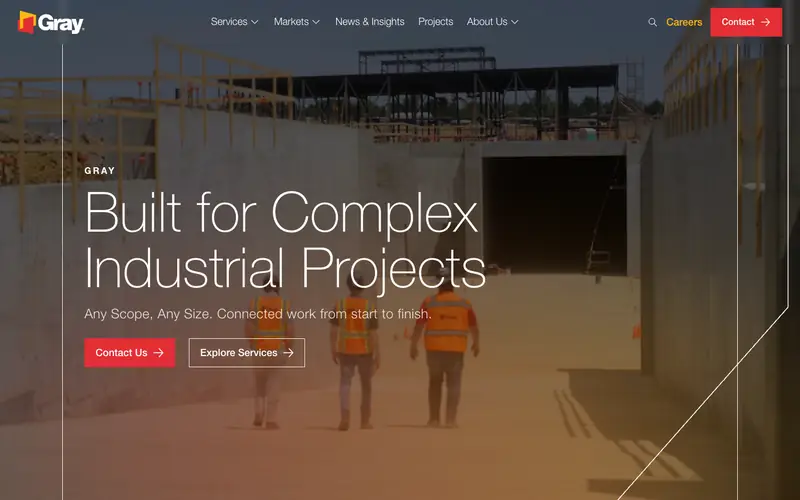
Gray names its niche in the headline: “Built for Complex Industrial Projects”, followed by “Any Scope, Any Size. Connected work from start to finish.” An industrial owner knows in one line that this firm fits.
A red Contact Us button and an outlined Explore Services button sit side by side, and further down the homepage carries a Frequently Asked Questions block, rare among large builders.
Copy this: say the kind of project you are best at in the headline, and answer the five questions buyers ask most on the homepage itself.
06. Messer Construction
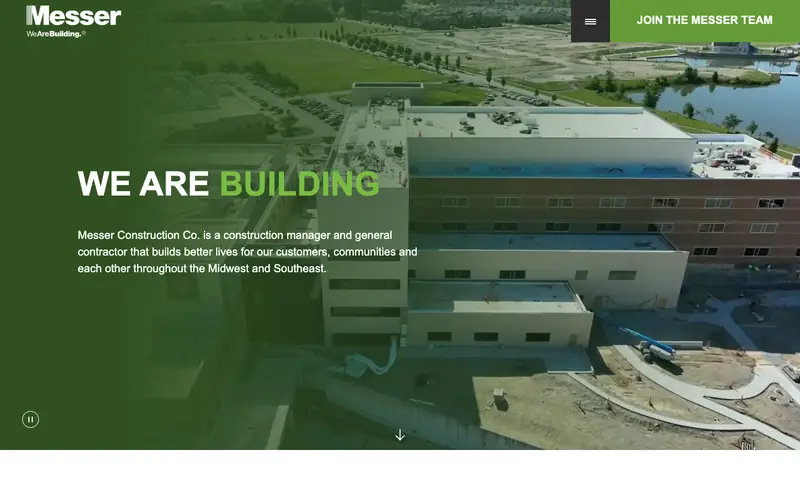
Under “We are building” sits one plain sentence: Messer is a construction manager and general contractor building across the Midwest and Southeast. Role and region, answered before the first scroll.
The background video carries a visible pause button, a small accessibility touch most video heroes skip. A green “Join the Messer team” tab keeps hiring visible without crowding the sales message.
Copy this: one sentence under the headline that says what you do and which region you cover, and a pause control on any moving background.
07. The Weitz Company
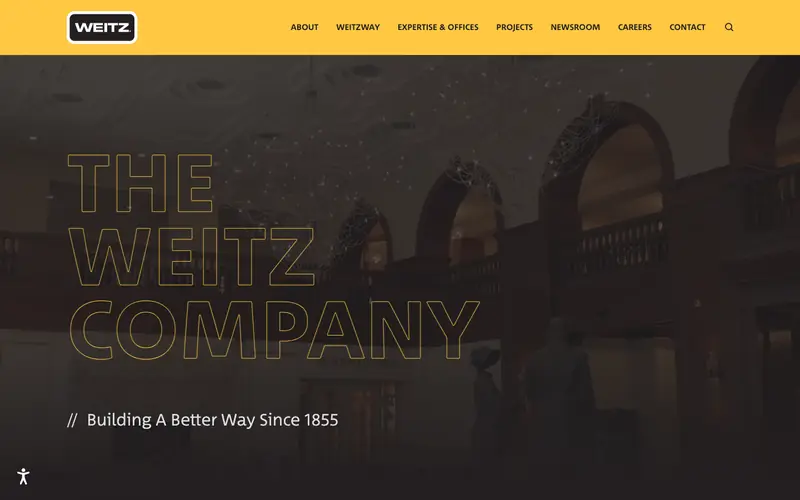
Weitz turns its name into the hero: tall outlined lettering in the brand yellow, the same yellow that fills the header bar. The line under the name dates the company to 1855, and the next section promises a “global business partner, right next door”.
The color system does the branding work. Even a visitor who scrolls fast leaves with yellow and black in mind.
Copy this: pick one brand color and use the color on the header, the buttons and your trucks, so the website and the job site look like one company.
Regional builders
Closer in size to most readers. Each one does one move well.
08. MATT Construction
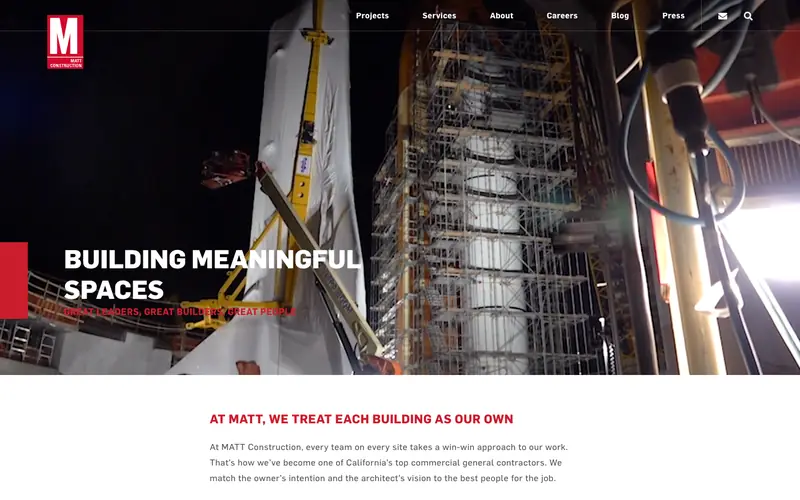
MATT pairs a dramatic scaffolding photo with “Building meaningful spaces”, then follows with a plain promise in red: “At MATT, we treat each building as our own.” The second line does the selling the headline cannot.
The page later lists recent awards and a mailing list, both cheap ways to stay in front of owners who are not ready to bid yet.
Copy this: follow your headline with one sentence promise written the way you would say the line to an owner across a table.
09. Blach Construction
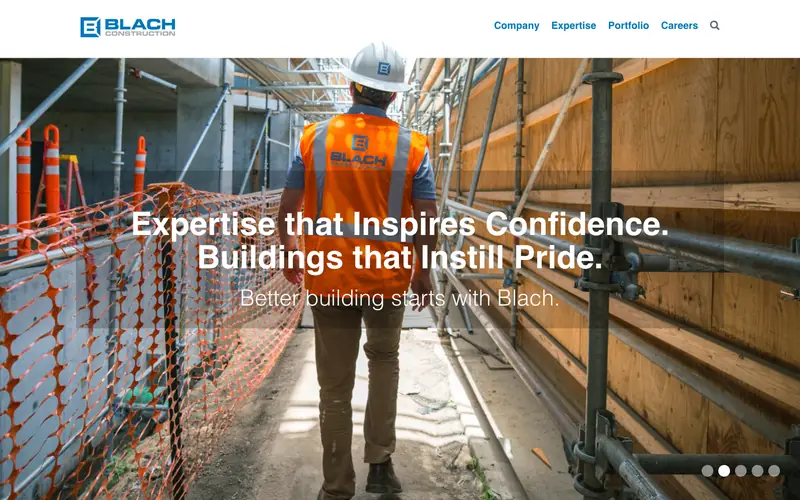
Blach shows a worker from behind in a vest printed with the company name, walking into the job. The brand is in the photo, not stamped on top of the photo.
The menu has four items: Company, Expertise, Portfolio, Careers. Nothing else competes with the headline.
Copy this: shoot your crew in branded gear on a live job, and cut your menu to four or five items.
10. JHL Constructors
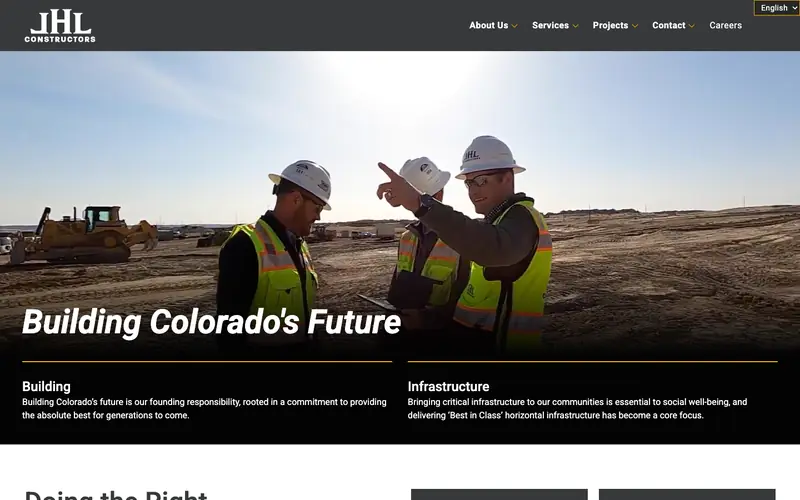
“Building Colorado’s Future” puts the state in the headline. Under the photo, two divisions, Building and Infrastructure, each get a one-line description, so a visitor picks a side without opening a menu.
The header also carries a language switch, which matters for a builder recruiting crews as well as winning bids.
Copy this: name your state or metro in the headline, and split your divisions into two labeled blocks in the first screen.
11. WEHR Constructors
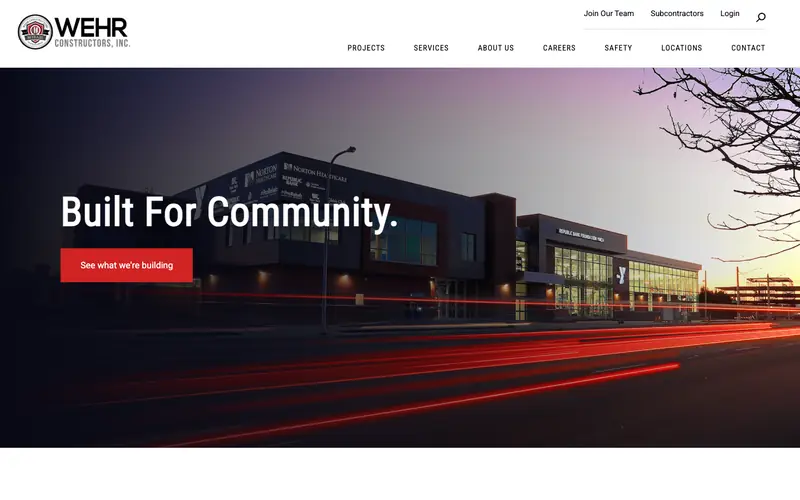
WEHR types out “Built For Community.” over a dusk photo of a finished YMCA and hospital, with light trails from passing traffic. One red button: “See what we’re building.”
Safety earns a spot in the main menu next to Projects and Services. Commercial owners check a safety record before they shortlist, and WEHR saves them the search.
Copy this: if you bid commercial work, give safety its own page and its own menu link.
12. HBW Construction
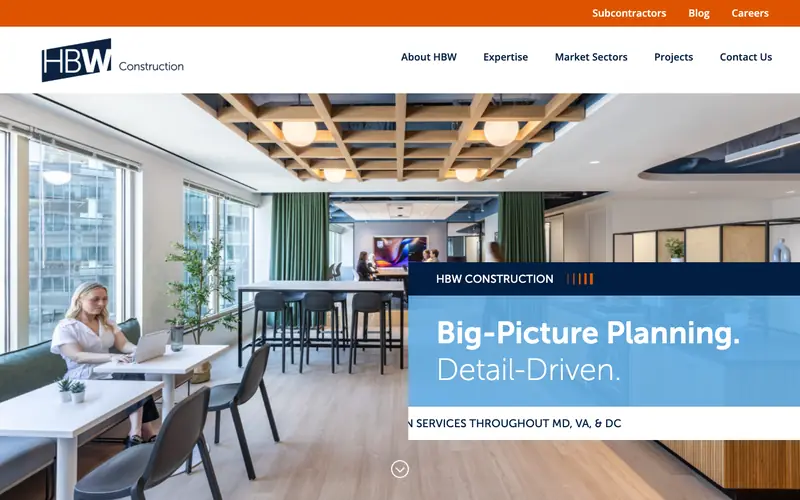
HBW shows a finished office interior instead of a construction site, the room the client is paying for. A blue panel reads “Big-Picture Planning. Detail-Driven.” and a line under the panel names the service area: Maryland, Virginia and DC.
The page title repeats the area: “Top Commercial Contractor in DC, MD, VA”. Google and the visitor see the same promise.
Copy this: show the finished space your client will use, and write your service area in both the title tag and the first screen.
13. Sullivan Cozart
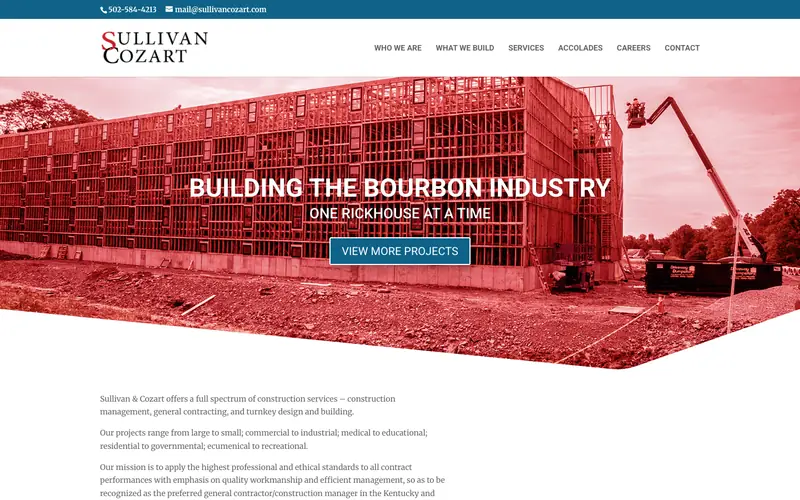
“Building the bourbon industry, one rickhouse at a time.” Few general contractors would dare lead with one niche, and Sullivan Cozart owns the niche because of that choice. A distiller searching for a builder sees a specialist on sight.
Phone and email sit in a slim bar above the logo, and the red duotone photo matches the logo color.
Copy this: if one type of project makes up a large share of your work, lead with that type even if you build others too.
14. Creative Builds
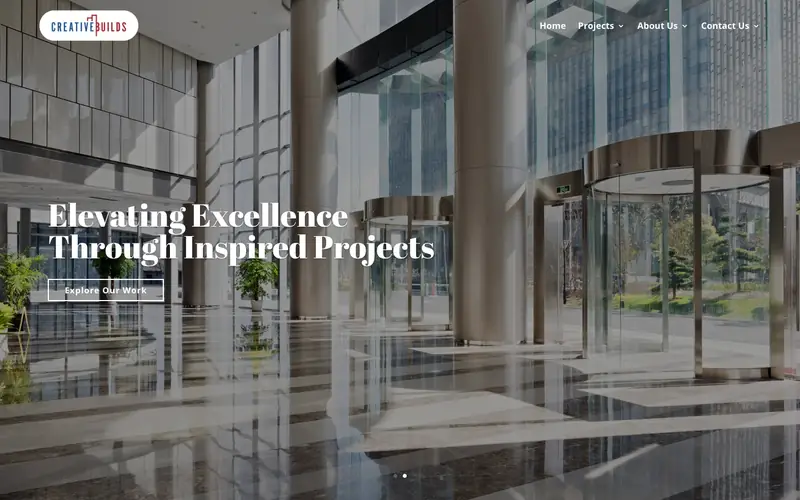
Creative Builds keeps a four-item menu and lets large photos of finished lobbies and offices do the talking. A section titled “Creatives Are the New Builders” makes the name into a point of view.
The headline is generic, and a rotating slider changes the message before a visitor reads the first one. The photography carries the page anyway.
Copy this: the photography standard. Hire a photographer for your three best finished projects before you spend on design.
Remodelers and home builders
Selling to homeowners, where trust and process matter more than scale.
15. Case Architects & Remodelers
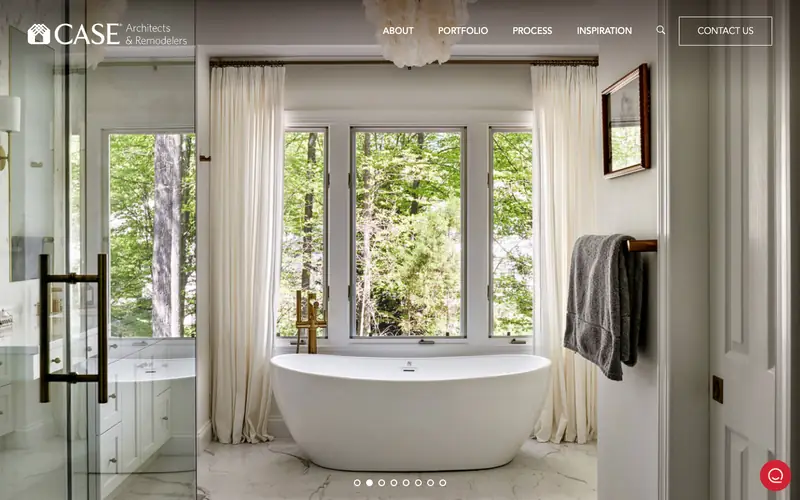
Case opens on a finished bathroom that fills the screen: a freestanding tub, tall windows, a towel on a brass rail. The homeowner sees the result, not the dust.
Process sits in the main menu beside Portfolio, and Contact Us is an outlined button in the header. The heading below, “Built around the way you live”, speaks to the person living in the house.
Copy this: put a Process page in your main menu. Homeowners fear the months of disruption more than the price.
16. Ben Tyler Building & Remodeling
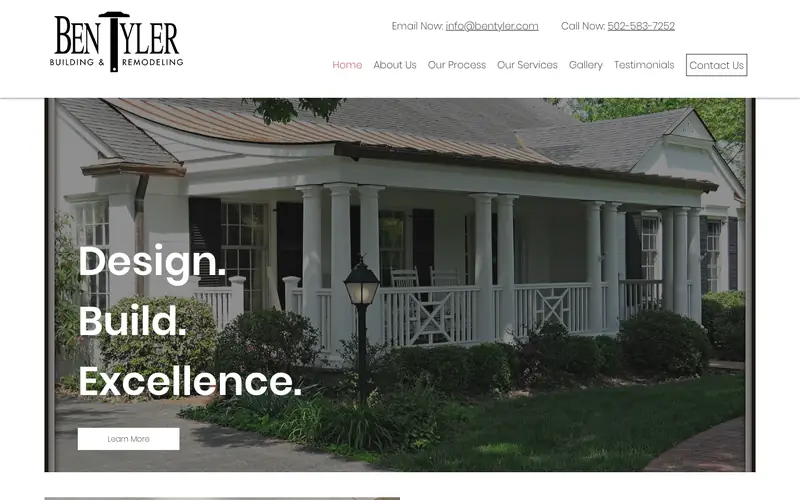
Ben Tyler prints “Email Now” and “Call Now” with the number in the top right corner of every page. The menu carries Our Process, Gallery and Testimonials as separate items.
The hero is a framed photo of a porch addition with three words stacked: Design. Build. Excellence. Simple, and fast to read on a phone.
Copy this: phone number and email in the top right corner, and Testimonials as its own menu item.
17. Castle Homes
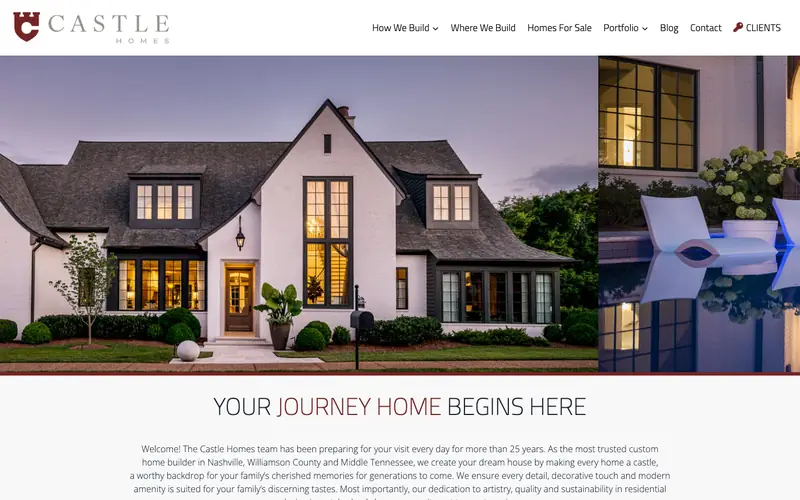
A white house glowing at dusk fills the top half, then “Your journey home begins here” with the word “journey” in the brand red. Further down, short testimonial headlines (“Renovation dream team!”, “Best in class!”) let a skimmer read the praise in a second.
The menu names Where We Build and Homes For Sale, and a Clients link with a key icon tells buyers there is a login for people mid-build.
Copy this: give each testimonial a four-word headline, and add a Where We Build page with the towns listed.
18. Sweenor Builders
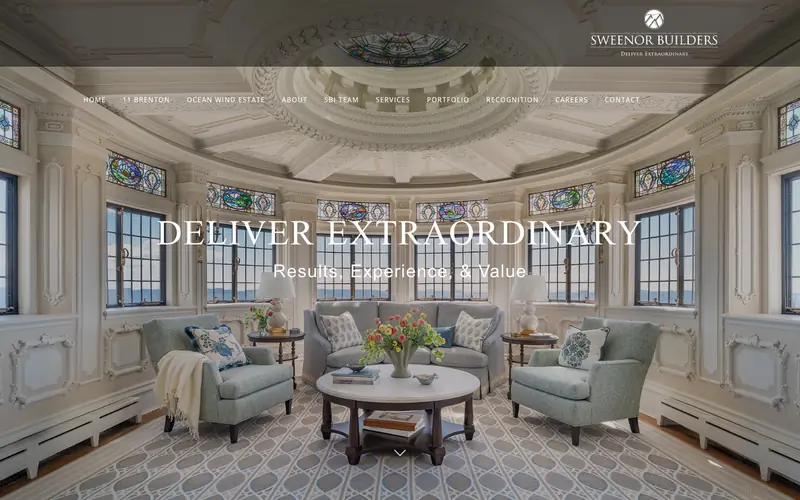
Sweenor puts named projects in the main menu: 11 Brenton and Ocean Wind Estate sit beside About and Services. For a high-end builder, the landmark houses are the sales pitch.
The hero is a restored round sunroom with stained glass and a serif headline, “Deliver Extraordinary”, that matches the clientele.
Copy this: give your two best projects their own pages and link them from the menu by name.
19. Re-Bath
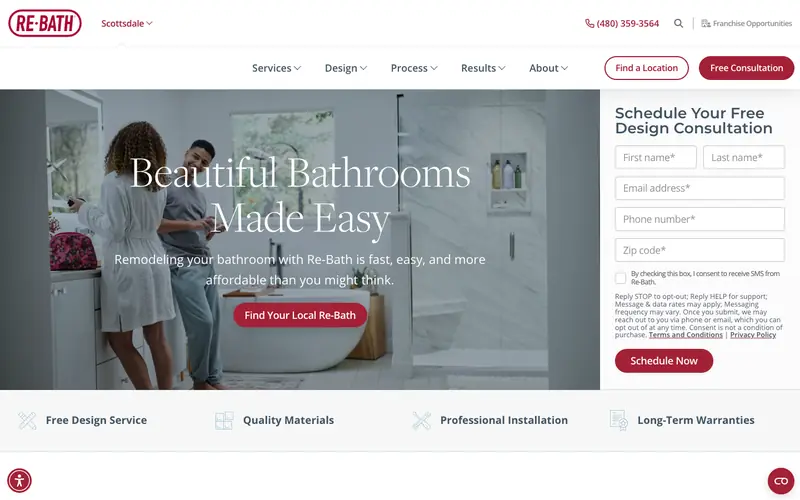
Re-Bath is the clearest lead machine in this list. The consultation form sits inside the first screen with five fields, the local phone number shows in the header, and a red Free Consultation button repeats the offer.
Under the hero, four short benefits line up with icons: Free Design Service, Quality Materials, Professional Installation, Long-Term Warranties. The page detected the visitor’s area and showed the nearest location.
Copy this: a short form beside your hero photo, and a strip of four benefits right under the photo.
Roofing, fence and home service
Trade contractors where the phone call is the whole goal.
20. Highland Roofing
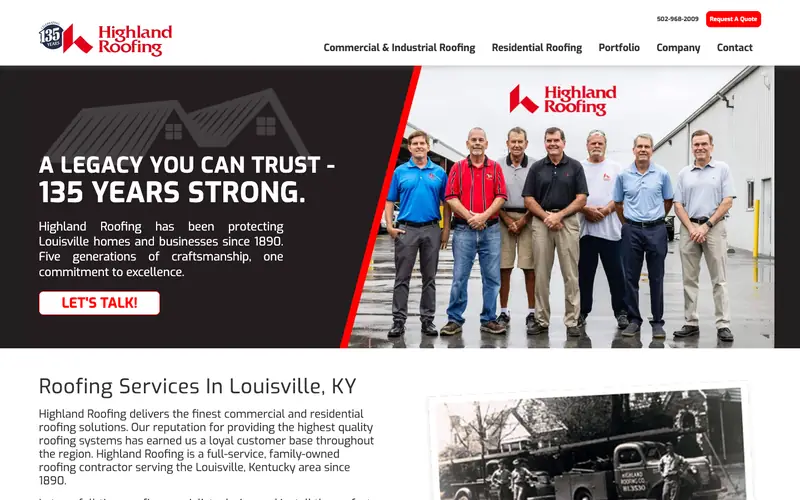
Highland splits the menu into Commercial and Industrial Roofing and Residential Roofing, two buyers, two doors. A phone number and a red Request A Quote button sit at the top right.
The hero shows the family team in matching polos beside the founding date, 1890, and a black and white photo of an early company truck sits just below. Heritage, proved with pictures.
Copy this: a team photo of the people who will show up, and separate menu items for homeowners and for property managers.
21. Mighty Dog Roofing
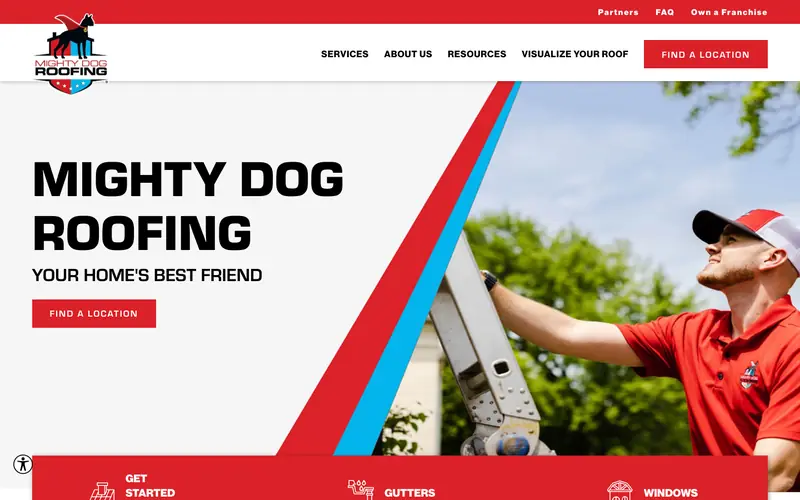
Mighty Dog has the boldest brand in the trade: a heavy black wordmark, red and blue stripes and the line “Your home’s best friend.” Nobody confuses this site with a template.
A “Visualize your roof” tool sits in the main menu, and a red service bar at the bottom of the hero lists Get Started, Gutters and Windows as one-click choices.
Copy this: a single memorable line for your brand, and a tool or calculator that lets the homeowner picture the result before calling.
22. Long Fence
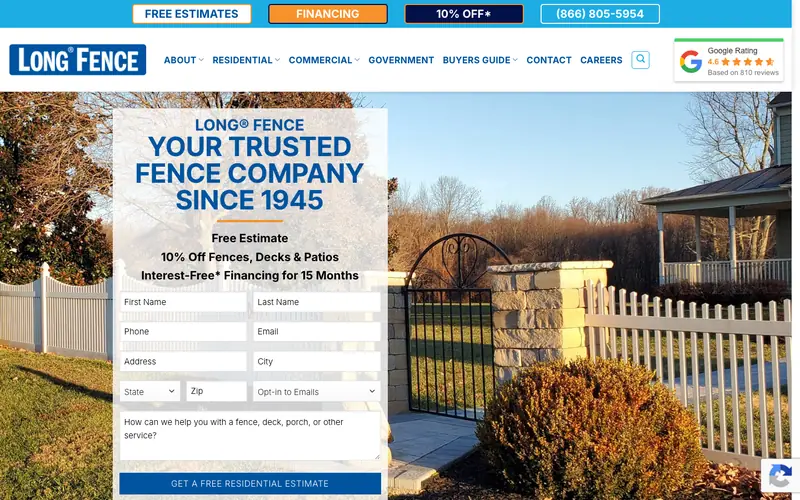
Long Fence packs the top bar with four offers: Free Estimates, Financing, 10% Off and the phone number. A Google rating badge in the header reads 4.6 from 810 reviews.
The estimate form sits in the hero beside a photo of a finished fence, and a Buyers Guide in the menu answers the material questions before a salesperson does.
Copy this: your Google rating and review count in the header, and a buyers guide page comparing your materials. Our fence company websites page shows how the same idea worked for Crown.
23. Archadeck Outdoor Living
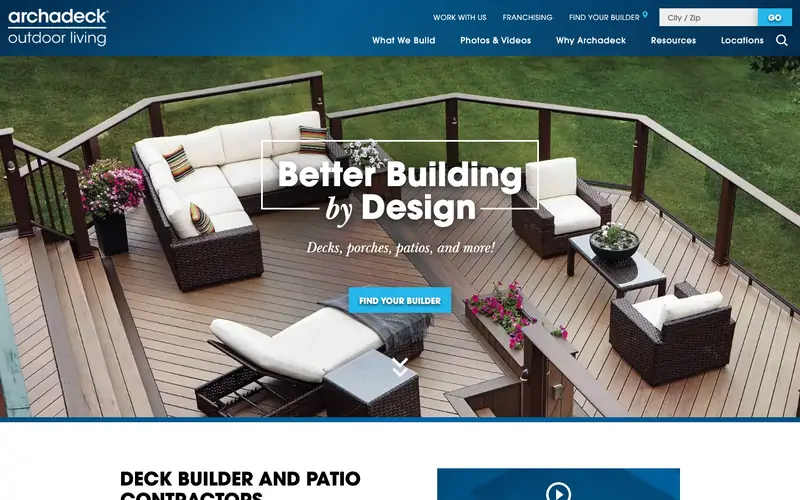
Archadeck puts a city or zip box in the header with a Go button. A homeowner types a zip and lands on the local builder, the shortest path in this list from search to the right crew.
The hero shows a furnished deck from above with “Better Building by Design” and the plain promise “Decks, porches, patios, and more!”. Photos and Videos has its own menu item.
Copy this: if you serve many towns, add a zip or town lookup, and make Photos a top-level menu item.
24. Jarboe’s
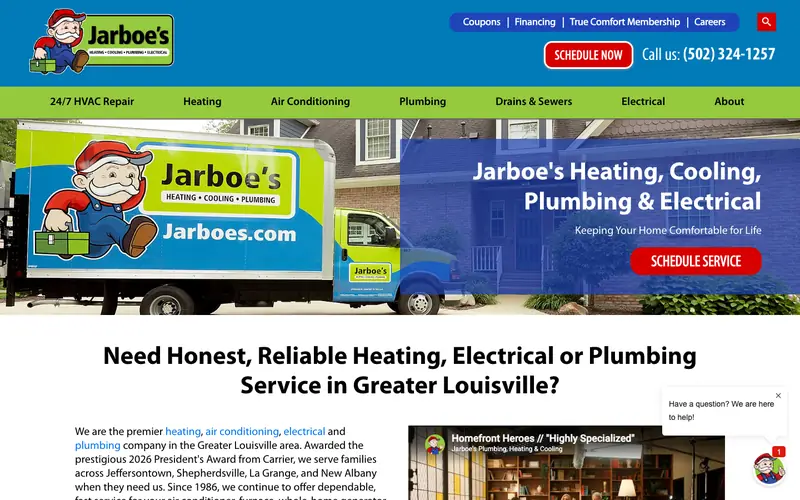
Jarboe’s shows the phone number in large type in the header with a red Schedule Now button, and a second menu row lists every service: 24/7 HVAC Repair, Heating, Air Conditioning, Plumbing, Drains and Sewers, Electrical.
The headline asks the reader’s own question and names the region: “Need honest, reliable heating, electrical or plumbing service in Greater Louisville?” A membership plan and coupons sit in the top bar. One caution: a $100 coupon popup covers the page on arrival, and a coupon bar already does that job without blocking anything.
Copy this: a service list as its own menu row, and your region named in the headline.
What the best contractor websites share
Counted from the 24 first screens above.
| Pattern | How many | What to take from the pattern |
|---|---|---|
| Photo or video in the hero | 24 of 24 | Most show finished work or the crew. Your own job photos are the baseline. |
| Careers or hiring link in the header | 17 of 24 | Builders recruit from the homepage. Keep the link small so the sales path stays first. |
| Background video | 7 of 24 | All seven are large general contractors. A smaller firm gets more from a strong still photo that loads fast on a phone. |
| Phone number in the first screen | 6 of 24 | Mostly the home service contractors. If homeowners call you, the number belongs in the header. |
| Location finder | 4 of 24 | All franchises or multi-office firms. A one-crew contractor needs a list of towns instead. |
| Quote form in the first screen | 2 of 24 | Re-Bath and Long Fence. Both sell high-volume home projects, where a short form beats a phone call. |
What to skip
Rotating sliders
Sundt and Creative Builds both rotate the hero. At any moment a visitor sees one message out of three, and most never wait for the second. Pick your strongest message and hold the slide still.
Popups on arrival
A coupon that covers the page before the visitor has read a word gets closed unread. A coupon bar or a banner under the hero earns the same click without the irritation.
Headlines any builder could use
“Elevating Excellence” and “Design. Build. Excellence.” fit every contractor in America. Compare Gray’s “Built for Complex Industrial Projects”, which only fits Gray.
Video without a pause button
Moving backgrounds distract some visitors and drain phone batteries. Messer puts a visible pause control on its video; if your hero moves, give visitors the same way to stop the motion.
Menus that list every project
Long dropdowns that name every service and every house turn the header into a site map. Keep five or six top items and let each page carry the detail.
What to copy first
On a small budget
You do not need Turner’s video crew. Five changes from this list cost little and move the needle for a contractor of any size.
- Phone number and a quote button in the top right of every page, as Highland and Ben Tyler do.
- A headline that names what you build and where, as JHL and Sullivan Cozart do.
- Your own crew or finished project as the hero photo, as McCarthy and Case do.
- A separate page for each trade or market, as Brasfield & Gorrie and Highland do.
- Your review score and a starting price in plain text, as Long Fence does with ratings and Crown does with prices.
The missing piece on every site above is a published starting price. None of the 24 first screens shows one; the only numbers are coupons, discounts and financing offers. A plain “from” price per foot or per project, written as text, would set any of these sites apart.
Want a site on this list?
JT Studio designs and builds contractor websites for builders across the US, with every pattern above priced in from the start: trade pages, job photos, a phone number in the header and starting prices in text. Sites start at $950, with one fixed price after a free call.
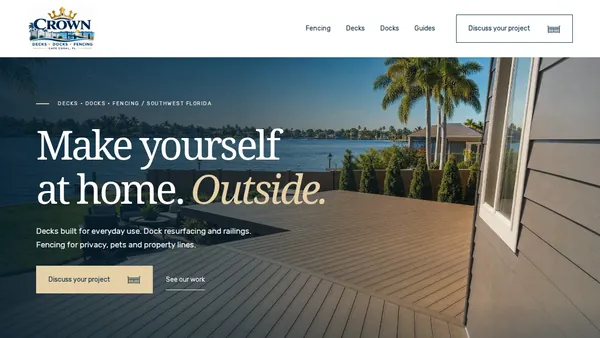
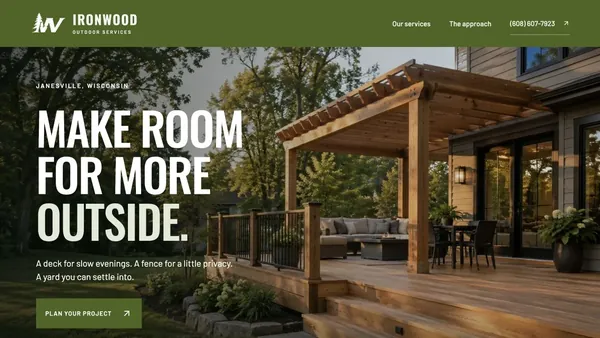
Crown Fence Co. in Florida and Ironwood Outdoor Services in Wisconsin are two of the contractor sites built so far.
Or go straight to web design pricing.
Questions about contractor websites
What is the best website for a construction company?
The best one answers what you build, where you build and how to start, in the first screen. Among the 24 above, Gray and JHL do the first two best, and Re-Bath and Long Fence make starting easiest. Size of budget matters less than those three answers.
What are the best websites for construction companies to copy?
For commercial builders, Turner for routing visitors and Brasfield & Gorrie for market tabs. For remodelers, Case for process and Re-Bath for the consultation form. For trade contractors, Highland Roofing and Long Fence for phone numbers, reviews and offers in the header.
What website do contractors use to find jobs?
That search usually means lead marketplaces and bid boards, which sell leads to many contractors at once. Your own website works differently: the homeowner or owner chooses you before calling, and nobody else gets the same lead.
What should a contractor homepage show first?
A photo of your own work, a headline naming what you build and where, a phone number, and one button to start a quote. Everything else can sit below the first screen.
How much does a contractor website cost?
A template costs little up front and a monthly fee after. A custom site from JT Studio starts at $950 for one page and $1,900 for a site with trade pages, at a fixed price you pay once, and you own the site.
Build the next best contractor website
Take the moves you liked above to a free call. You leave with a page plan for your trades and a fixed price, from $950.
No cost, no prep. By video, anywhere in the US.